When you Save an image for the first time or Save As, you'll notice that you have a wealth of different graphic file formats to choose from. For Photoshop beginners, all these file formats can be rather daunting. The following is just a brief overview of what some of these file formats are, how they are used, and when to use them. Many of the formats, you'll be pleased to know, you will never, ever, EVER use.
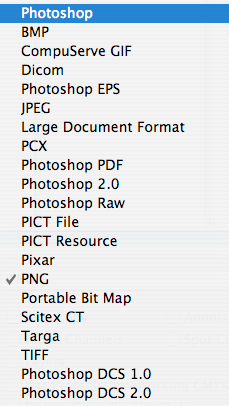
Photoshop (.psd): This is Photoshop's native file format. If you have created a graphic with a multitude of layers (especially type layers), and you want to save these layers for any changes that you intend to make in the future, then it's generally best to save the graphic in Photoshop format. It used to be that you could only save layered files as .psd but now .tif format saves layers as well.
BMP (.bmp): This is Microsoft's native graphic file format, so obviously, it works well with any Microsoft product.
CompuServe GIF (.gif): GIF format is primarily used for creating Web graphics. It only supports 256 colors (which keeps GIF file sizes down) and is widely supported on all computer platforms. However, when creating GIFs, I find that it is far more preferable to go to the File menu and select Save for Web & Devices because this Save option dialog box gives you far more control over the quality of the .gif created.
Dicom (.dcm): Not widely used. According to Adobe: "The DICOM (Digital Imaging and Communications in Medicine) format is commonly used for the transfer and storage of medical images, such as ultrasounds and scans. DICOM files contain both image data and headers, which store information about the patient and the medical image. You can open, edit, and save DICOM files in Photoshop Extended."
Photoshop EPS (.eps): EPS stands for Encapsulated PostScript format, which is based on the PostScript printing language. Most .eps graphics are created and edited in a draw (vector) application like Illustrator, and when you open an Illustrator vector .eps image in Photoshop, Photoshop will still convert it to pixels. As such, an Illustrator .eps doesn't have the same editable properties as a Photoshop .eps graphic so don't confuse the two. Photoshop .eps format is primarily used for creating images with clipping paths and monotone/duotones. It used to be that an image with a clipping path could only be saved as in .eps format in Photoshop. This is no longer true with later versions of Photoshop where you can save graphics with clipping paths in .tif format as well. When you create a monotone or duotone image in Photoshop, it is still best to save it in this .eps graphic file format, although .psd and .pdf options are also available.
JPEG (.jpg): Along with GIF, JPEG is most commonly used for Web graphics. Unlike the GIF format, which only supports 256 colors, JPEG supports millions and allows for graphic compression. Most people use JPEG for Web graphics that contain a multitude of colors and gradations — like photographic images. It's also a handy file format if you frequently switch from Mac to PC platforms because JPEG graphics can be easily opened in both Macintosh and Windows applications. However, as with GIFs, when creating JPEGs, I find that it is far more preferable to go to the File menu and select Save for Web & Devices because this Save option dialog box gives you far more control over the quality of the .jpg created.
Large Document Format (.psb): Not widely used. According to Adobe, "the Large Document Format (PSB) supports documents up to 300,000 pixels in any dimension."
PCX (.pcx): PC Paintbrush's native graphic file format and widely used on IMB PC-compatible computers.
Photoshop PDF (.pdf): Enables you to save graphics in PDF format so they can be opened in Adobe Acrobat. Very handy.
Photoshop 2.0: Use this format to save files so that they can be opened in Photoshop version 2. I'm not kidding.
Photoshop Raw (.raw): This is not the same as Camera Raw from a digital camera. According to Adobe: "The Photoshop Raw format is a flexible file format for transferring images between applications and computer platforms."
PICT File (.pct): Apple Macintosh's native graphic file format. Not really (and shouldn't be) used anymore. Let PICT die, please.
PICT Resource (.pxr): A graphic file format used to create Macintosh startup screens. It serves no other purpose that I know of.
Pixar (.pxr): Pixar is an animation company (most famous as the creator of Toy Story and Bug's Life). Most of Pixar's animation is done on Pixar work stations with Pixar as the native graphic file format. Basically, it's another graphic file format you probably won't use.
PNG (.png): PNG (Portable Network Graphics) was initially developed as a "patent-free alternative to GIF" for web development but it never took. Many browsers don't support PNG so it's not widely used except perhaps as screenshots and in email.
Portable Bit Map (.pbm): Not widely used. According to Adobe: "The Portable Bit Map (PBM) file format, also known as Portable Bitmap Library and Portable Binary Map, supports monochrome bitmaps (1 bit per pixel). The format can be used for lossless data transfer because many applications support this format. You can even edit or create such files within a simple text editor."
Scitex CT (.sct): Another graphic file format that you will probably never use unless you work with Scitex computer systems, scanners and printing devices.
Targa (.tga): Yet another graphic file format that you will probably never use. For use with TrueVision's Targa and NuVista video.
TIFF (.tif): TIFF is the most widely supported graphic file format in existence. It is the best graphic file format for use in layout applications like InDesign and QuarkXPress. Graphics saved in TIFF format can be easily opened on both Macintosh and PC/Windows platforms. When in doubt, use .tif.
Photoshop DCS 1.0 and 2.0 (.eps): Used to make Desktop Color Separations (DCS). I've never used this file format in Photoshop but have when making an eps of a page (File > Save Page as EPS) in QuarkXPress.